


Link your ER:LC server to Discord to manage your private server directly from the Discord interface. This integration allows administrators to perform server management tasks more efficiently without switching between platforms.
Commands that require a configured API key will not function correctly until a valid API key has been added via the dashboard.
ER:LC ConfigurationCopy link to section
- Navigate to the Boomerang dashboard and locate the ER:LC plugin on the overview page. Click “Enable” to activate it.
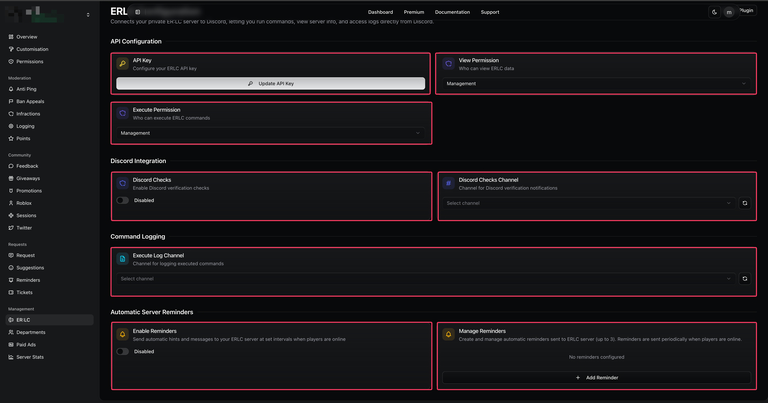
- Once enabled, open the plugin’s settings by selecting “Configure” from the overview page or by navigating directly to the ER:LC page within the dashboard.
| Customisation | Description |
|---|---|
| API Key | Connect your ER:LC server to Discord. You must be a co-owner in-game to obtain the API Key from the server settings. |
| View Permission | This determines which users are permitted to run the |
| Execute Permission | This setting permits users to run the |
| Discord Checks | Enable or disable Discord check reminders, which Boomerang sends every 30 minutes. |
| Discord Checks Channel | When enabled, Boomerang sends an embed to the selected channel every 30 minutes listing users who are not present in the Discord server. |
| Execute Log Channel | When enabled, this setting logs all commands executed utilising |
| Enable Reminders | This setting automatically sends H or M messages to your ER:LC server. |
| Manage Reminders | Configure custom H&M messages to be sent automatically. This feature requires the Enable Reminders setting to be active to function. |
ER:LC CommandsCopy link to section
| Command | Description |
|---|---|
/server execute | This setting allows users with the assigned permissions to execute
commands from Discord on the in-game server. For security reasons,
commands that use |
/server view | This command allows you to view server logs directly from Discord. Available information includes moderation calls, kill logs, command logs, server details, active players, and the server queue. |