


With the sessions plugin you are able to start a session, end a session, and vote for a session along with multiple other commands. Boomerang allows you to enhance your server management with sessions.
At this time, only ER:LC game codes are supported. Support for other games is not possible without the availability of a public developer API. We recommend directing requests for additional game integrations to the respective game developers so that an appropriate API can be implemented.
Sessions ConfigurationCopy link to section
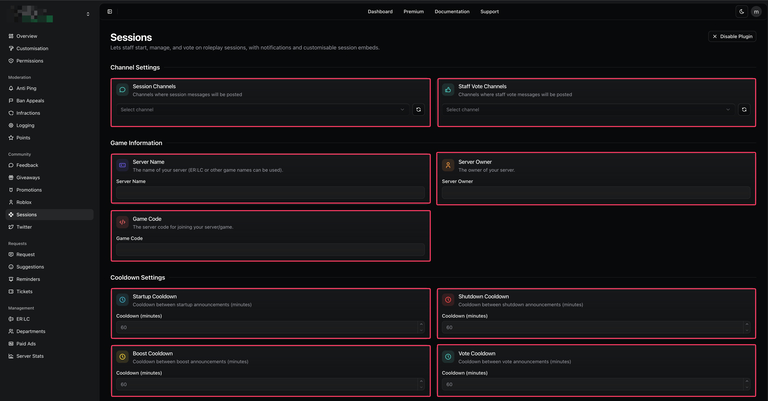
- Navigate to the Boomerang dashboard and locate the Sessions plugin on the overview page. Click “Enable” to activate it.
- Once enabled, open the plugin’s settings by selecting “Configure” from the overview page or by navigating directly to the Sessions page within the dashboard.
- If you are a Boomerang Premium subscriber, you may also customise the Sessions embed and Status Message embed and components.
| Customisation | Description |
|---|---|
| Sessions Channel | The designated channel where session embeds will be posted. |
| Sessions Role | The role permitted to run all session-related commands. |
| Server Code | The ER:LC server code that is displayed when a session starts and used for the session button. |
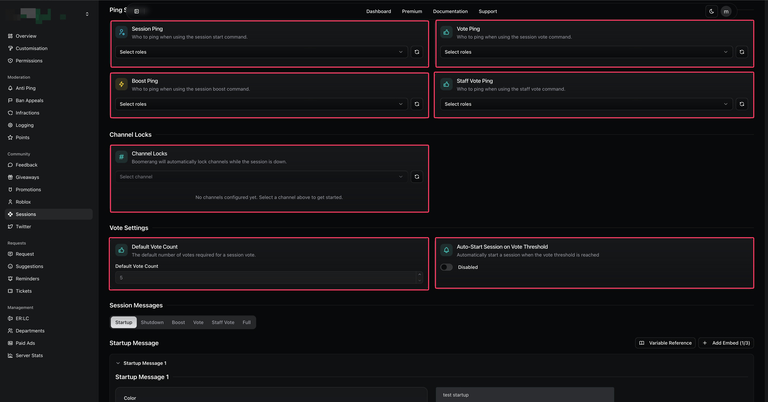
| Sessions Ping | The role that Boomerang will mention when the |
| Vote Ping | The role that Boomerang will mention when the |
| Boost Ping | The role that Boomerang will mention when the |
| Session Cooldown | Specifies the cooldown applied to each session command individually. |
| Channel Lock | When a session shutdown is initiated. Boomerang will automatically lock or hide the configured channels. |
| Auto-Start Session on Vote Threshold | Whether Boomerang should automatically begin the session when the required number of votes is reached. |
| Default Vote Count | The default number of votes required to start a session. |
Sessions CommandsCopy link to section
Only users with the configured Management or Session Role permissions, as set in the dashboard, may access session commands.
| Command | Description |
|---|---|
/session vote | Sends an embed containing two voting buttons, with a configurable vote threshold. |
/session start | Sends an embed to the sessions channel, mentioning both the voters and the configured role. |
/session boost | Sends an embed indicating that the server is low on players. |
/session shutdown | Sends an embed indicating that the server has shut down. |
/session full | Announces that the server is full, having reached the maximum capacity of 39 out of 39 players. |